1. Setting up a connection
To set up a connection, navigate to the Connections page in Workspace
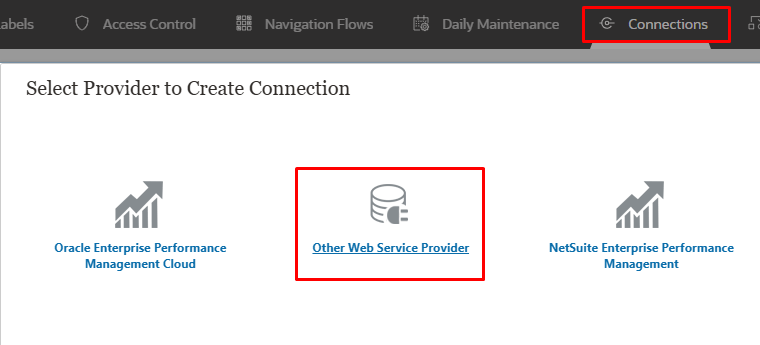
Once you are on the Connections page, select “Other Web Service Provider”.
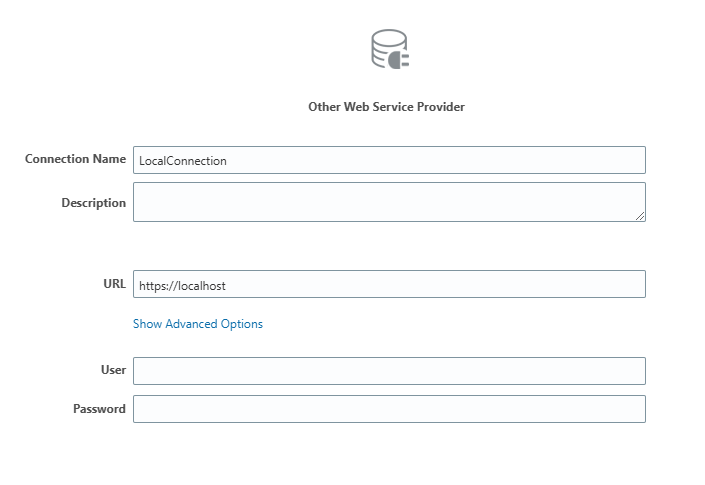
Required fields:
- Connection Name – LocalConnection
- URL – https://localhost
- User
- Password
The benefit of using the localhost link instead of ...oraclecloud.com is that you do not need to adjust the link when migrating the connection from Test/Dev to Prod. However, you will need to update the User and Password!
2. Groovy Rule
Once the Connection is created, open Calc Manager, and let’s get grooving!
HttpResponse<String> jsonResponse = operation.application.getConnection("LocalConnection").post('/HyperionPlanning/rest/v3/applications/{AppName}/jobs').header("Content-Type", "application/json").body(json(["jobType":"Rules", "jobName":"{RuleName}"])).asString()Copy and paste the script… Replace the AppName and RuleName… and Voila
Now, this is as simple as it gets—but why stop here? Let’s add RTPs, print the JSON responses, and make them look pretty!
3. Run Time Prompts (RTPs)
The basics… add RTPs to the top
/*RTPS:{RTP_Scenario},{RTP_Version},{RTP_Entity}*///Define Runtime Promptsdef inScenario = rtps.RTP_Scenario.member.name;def inVersion = rtps.RTP_Version.member.namedef inEntity = rtps.RTP_Entity.member.name;Once you have added the RTPs, you can apply them to the Groovy script as parameters.
/*RTPS:{RTP_Scenario},{RTP_Version},{RTP_Entity}*///Define Runtime Promptsdef inScenario = rtps.RTP_Scenario.member.name;def inVersion = rtps.RTP_Version.member.name;def inEntity = rtps.RTP_Entity.member.name;//Define rule namedef ruleName = "Your_Rule_Name" // Replace with actual rule name//Create REST API to execute a ruleHttpResponse<String> jsonResponse = operation.application.getConnection("LocalConnection") .post("/HyperionPlanning/rest/v3/applications/" + application.name + "/jobs") .header("Content-Type", "application/json") .body(json([ "jobType": "Rules", "jobName": ruleName, "parameters": [ "RTP_Entity": inEntity, "RTP_Scenario": inScenario, "RTP_Version": inVersion ] ])).asString()4. awaitCompletion… getting a response from the application until the rule done
I’m a fan of using functions to keep things nice and clean, so let’s do that!
//Define check boolean variableboolean CompletionCheck//Define function to await completion of the RuleSetdef awaitCompletion(HttpResponse<String> jsonResponse, String connectionName, String operationDesc){ final int IN_PROGRESS = -1 final int SUCCESS = 0 // Get the status of the operation. Keep polling the server until the operation is completed ReadContext ctx = JsonPath.parse(jsonResponse.body) int status = ctx.read('$.status') String jobId = (String)ctx.read('$.jobId') // Extract jobId once for(long delay = 50; status == IN_PROGRESS; delay = Math.min(1000, delay * 2)) { sleep(delay) status = getJobStatus(connectionName, jobId) } println("$operationDesc ${status == SUCCESS ? "completed successfully" : "failed with status: $status"}.\n") return status == SUCCESS}5. Add Job Response function
Can’t forget to add the Job Response function to parse the job status!
//Get Job responseint getJobStatus(String connectionName, String jobId){ HttpResponse<String> pingResponse = operation.application.getConnection("LocalConnection").get("/rest/v3/applications/AppName/jobs/" + jobId).asString() return JsonPath.parse(pingResponse.body).read('$.status')}The last step here – Call the function!
CompletionCheck = awaitCompletion(jsonResponse, {ConnectionName}, "The business rule executed ")6. Let’s tie everything together
Here is the script…
/*RTPS:{RTP_Scenario},{RTP_Version},{RTP_Entity}*///Define Runtime Promptsdef inScenario = rtps.RTP_Scenario.member.name;def inVersion = rtps.RTP_Version.member.name; // Added missing semicolondef inEntity = rtps.RTP_Entity.member.name;//Define variablesdef connectionName = "LocalConnection"def ruleName = "YourRuleName" // Replace with actual rule name//Define check boolean variableboolean CompletionCheck//Define function to await completion of the Ruledef awaitCompletion(HttpResponse<String> jsonResponse, String connName, String operationMsg){ final int IN_PROGRESS = -1 // Get the status of the operation. Keep polling the server until the operation is completed ReadContext ctx = JsonPath.parse(jsonResponse.body) int status = ctx.read('$.status') for(long delay = 50; status == IN_PROGRESS; delay = Math.min(1000, delay * 2)) { sleep(delay) status = getJobStatus(connName, (String)ctx.read('$.jobId')) } println("$operationMsg ${status == 0 ? "successful" : "failed"}.\n") return status == 0}//Get Job responseint getJobStatus(String connName, String jobId){ HttpResponse<String> pingResponse = operation.application.getConnection(connName) .get("/rest/v3/applications/" + application.name + "/jobs/" + jobId) .asString() return JsonPath.parse(pingResponse.body).read('$.status')}//Create REST API to execute a ruleHttpResponse<String> jsonResponse = operation.application.getConnection(connectionName) .post("/HyperionPlanning/rest/v3/applications/" + application.name + "/jobs") .header("Content-Type", "application/json") .body(json([ "jobType": "Rules", "jobName": ruleName, "parameters": [ "RTP_Entity": inEntity, "RTP_Scenario": inScenario, "RTP_Version": inVersion ] ])).asString()CompletionCheck = awaitCompletion(jsonResponse, connectionName, "The business rule executed")That’s it! Let me know what you think in the below

 EPM on-the-go
Leave a comment