A couple of years back, I worked on a project where I had to extract data from an Oracle database and write the data into an Excel spreadsheet. This task was slightly outside the scope of EPBCS but still relevant
Truthfully, this task could have been accomplished using a SmartView Ad-Hoc sheet, but there were other factors that prevented us from doing so
Let’s think of a scenario here: imagine your client is asking you to create a customized report using Excel. The simple answer would be to use HSGetValue to achieve this. However, we all know this is not the most effective way to collect data since HSGetValue generates a connection per cell
The next option might be creating an Ad-Hoc sheet and then linking the cells to a report in a different sheet in Excel. While this sounds a bit complicated, it is still a viable option
The third option—obviously, we have to make it a little nerdy—is to use Python
1. Importing Python Libraries
We needs a few libraries here in order to write the following scripts
from pip._vendor import requests
import json
import xlsxwriter
2. Create request
In order to create a session, you will need a native credential (Basic Auth)
The credential format is oracledomain.username, password but please encrypt your password
#Create session
session = requests.Session()
session.auth = ("oracledomain.Username", "password")
print("Session created.")
3. Create the JSON request format
Store the JSON request in a .json file on your server or local drive. This is an example from Oracle Docs
{
   "exportPlanningData": true,
   "gridDefinition": {
      "suppressMissingBlocks": true,
      "suppressMissingRows": true,
      "pov": {
         "members": [
            [ "BaseData" ], [ "FY15" ], [ "Plan"],[ "Working" ],["410" ],["P_160" ]
         ]
      },
      "columns": [
         {
            "members": [
               [
                  "IDescendants(Q1)"
               ]
            ]
         },
         {
            "members": [
               [ "IDescendants(Q2)" ]
            ]
         }
      ],
      "rows": [
         {
            "members": [
               [
                  "Project Number",
                  "Request Date",
                  "Project Type",
                  "Project Investment"
               ]
            ]
         }
      ]
   }
}
4. Create a post request to export data – DataExportSlice
Replace
- PathtoFile
- BaseURL
- AppName
- CubeName
#Read JSON payload
with open('{pathtoFile}\\JSONRequest.json') as f:
    JSONRequest = json.load(f)
jsonResponse = session.post('https://{BaseURL}/HyperionPlanning/rest/v3/applications/{AppName}/plantypes/CubeName/exportdataslice',json=JSONRequest)
5. Here is the data if you print(json.dumps(JSONResponse, indent = 6))
{
   "pov": [
      "BaseData",
      "FY15",
      "Plan",
      "Working",
      "410",
      "P_160"
   ],
   "columns": [
      [
         "Jan",
         "Feb",
         "Mar",
         "Q1",
         "Apr",
         "May",
         "Jun",
         "Q2"
      ]
   ],
   "rows": [
      {
         "headers": [
            "Project Number"
         ],
         "data": [
            "1",
            "2",
            "3",
            " "
         ]
      },
      {
         "headers": [
            "Project Type"
         ],
         "data": [
            "Other",
            "IT",
            "Construction",
            ""
         ]
      },
      {
         "headers": [
            "Project Investment"
         ],
         "data": [
            "100000",
            "110000",
            "200000",
            "410000"
         ]
      }
   ]
}
6. Now you can use XLSXWRITER to create your customized report in Excel
#Write to xlsx
Template = xlsxwriter.Workbook('C:\\Oracle\\Sample\\Excel\\SampleExcel.xlsx')
SampleSheet = Template.add_worksheet("Sample")
for index, item in enumerate(JSONResponse['pov']):
    SampleSheet.write(0,index+1,item)
for index, item in enumerate(JSONResponse['columns'][0]):
    SampleSheet.write(1,index+1,item)
for idx, i in enumerate(JSONResponse['rows']):
    for index, item in enumerate(JSONResponse['rows'][idx]['headers']):
        SampleSheet.write(idx+2,0,item)
    for index, item in enumerate(JSONResponse['rows'][idx]['data']):
        SampleSheet.write(idx+2,index+1,item)
Template.close()
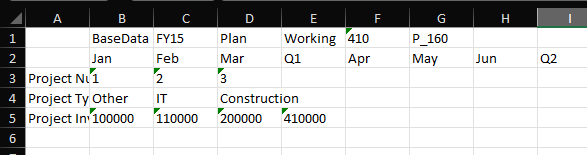
Here is what the spreadsheet looks like… Not very pretty
7. Let’s add a little formatting
MetaDataStyle = Template.add_format({'bg_color': '#d3d3d3'})
DataStyle = Template.add_format({'bg_color': '#FFFFCC','locked':False,'num_format':'#,##0.00'})
for index, item in enumerate(JSONResponse['pov']):
    SampleSheet.write(0,index+1,item,MetaDataStyle)
for index, item in enumerate(JSONResponse['columns'][0]):
    SampleSheet.write(1,index+1,item,MetaDataStyle)
for idx, i in enumerate(JSONResponse['rows']):
    for index, item in enumerate(JSONResponse['rows'][idx]['headers']):
        SampleSheet.write(idx+2,0,item,MetaDataStyle)
    for index, item in enumerate(JSONResponse['rows'][idx]['data']):
        SampleSheet.write(idx+2,index+1,item,DataStyle)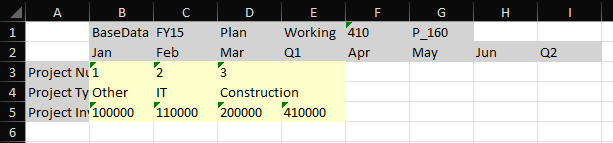
Don’t love this either… Arguably, it’s even worse… So what should we do here?
Let’s just add formatting to the columns instead of the cells
8. Additional formatting
MetaDataStyle = Template.add_format({'bg_color': '#d3d3d3'})
DataStyle = Template.add_format({'bg_color': '#FFFFCC','locked':False,'num_format':'#,##0.00'})
#Set column
SampleSheet.set_column('A:A',None,MetaDataStyle)
SampleSheet.set_column('B:I',None,MetaDataStyle)
for index, item in enumerate(JSONResponse['pov']):
    SampleSheet.write(0,index+1,item)
for index, item in enumerate(JSONResponse['columns'][0]):
    SampleSheet.write(1,index+1,item)
for idx, i in enumerate(JSONResponse['rows']):
    for index, item in enumerate(JSONResponse['rows'][idx]['headers']):
        SampleSheet.write(idx+2,0,item)
    for index, item in enumerate(JSONResponse['rows'][idx]['data']):
        SampleSheet.write(idx+2,index+1,item,DataStyle)
#Auto fit column width
SampleSheet.autofit()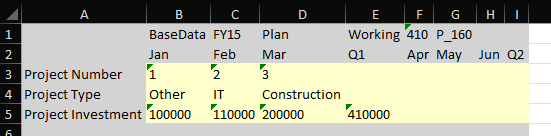
Not great either but you get the point. There is a lot you can do with XLSXWRITER https://xlsxwriter.readthedocs.io/worksheet.html#worksheet-write
9. Make sure you save the template
Template.close()10. Here is the full script
from pip._vendor import requests
import json
import xlsxwriter
#Create session
session = requests.Session()
session.auth = ("oracledomain" + '.' + "Username, "password")
#Write to xlsx
Template = xlsxwriter.Workbook('C:\\Oracle\\Sample\\Excel\\SampleExcel.xlsx')
SampleSheet = Template.add_worksheet("Sample")
MetaDataStyle = Template.add_format({'bg_color': '#d3d3d3'})
DataStyle = Template.add_format({'bg_color': '#FFFFCC','locked':False,'num_format':'#,##0.00'})
#Set column
SampleSheet.set_column('A:A',None,MetaDataStyle)
SampleSheet.set_column('B:I',None,MetaDataStyle)
for index, item in enumerate(JSONResponse['pov']):
    SampleSheet.write(0,index+1,item)
for index, item in enumerate(JSONResponse['columns'][0]):
    SampleSheet.write(1,index+1,item)
for idx, i in enumerate(JSONResponse['rows']):
    for index, item in enumerate(JSONResponse['rows'][idx]['headers']):
        SampleSheet.write(idx+2,0,item)
    for index, item in enumerate(JSONResponse['rows'][idx]['data']):
        SampleSheet.write(idx+2,index+1,item,DataStyle)
#Auto fit column width
SampleSheet.autofit()
Template.close()
 EPM on-the-go
Leave a comment