Attribute dimensions are great for grouping data and reporting but updating attributes can be a cumbersome task for administrators. The advantage of using SmartList to update attributes is that it shifts the responsibility from administrators to users
Here is a simple Groovy script to use when updating Attribute Dimension using Groovy
Here is a simple example: Update the Project Status using a SmartList and link it to the Attribute Dimension – Phases
1. Set up the Form
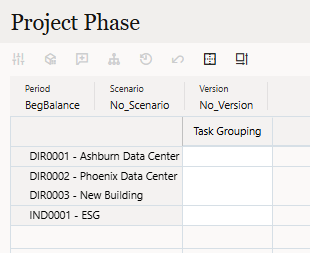
2. Set up the Attribute Dimension
I set up my attribute dimension in the Project dim
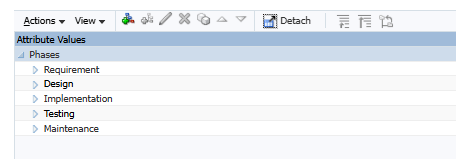
3. Set up the SmartList
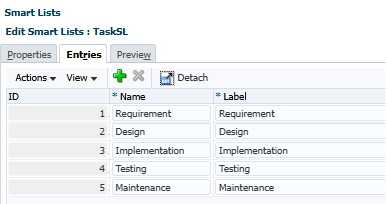
4. Write the Groovy Script
This is a very simple script
- Define Cube and Dimension
- Create a Grid Iterator
- If Condition to look for the Account
- Define Project Group by getting SmartList
- Define and substring Project Group
- Save Attribute Dimension
Cube cube = operation.application.getCube("{CubeName}")
Dimension ProjectDim = operation.application.getDimension("Project", cube)
// Create the grid definition builder
operation.grid.dataCellIterator().each{
    Member mbrProject = operation.application.getDimension("Project").getMember(it.getMemberName("Project").toString())
    if(it.getMemberName("Account") == "TaskGrouping"){
        def strProjGrouping = operation.application.getSmartList("TaskSL").getEntry(it.data.intValue()).getName()
        def strProjGroupingLoad = strProjGrouping.substring(0)
        mbrProject = ProjectDim.saveMember(mbrProject.toMap() << (["Phases":strProjGroupingLoad.toString()] as Map))
    }
}
5. Attach the script to the Form (Run on Save)
6. Test it out
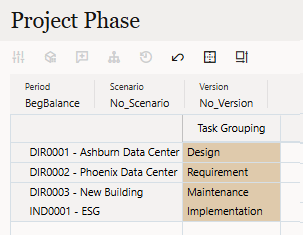
7. Validate Attribute Dimension
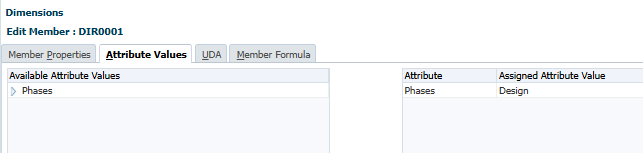
And there it is!
 EPM on-the-go
Leave a comment