Arguably the most important topic
FlexibleDataGridDefinitionBuilder is the new DataGridDefinitionBuilder. It provides a more flexible and intuitive way to define data grids and removes some of the rigid and sometimes tricky syntax required by the traditional DataGridDefinitionBuilder.
Imagine we have a form where users enter trend assumptions by expense account, and we want to collect and print those assumptions.
Let’s take a look at the code.
When you think about building an ad hoc Smart View grid in Excel, what is the first thing you do?
You right-click on a cube and create an ad hoc sheet.
It’s the same idea when coding with Groovy – you first need to define the cube. In addition to the cube, let’s define a Map variable to collect the data.
Cube cube = operation.application.getCube("Plan1")def methodByAcct = [:] as Map<String,String>
Once you have defined the cube, you need to define the grid, including the POV, columns, and rows.
//define the grid builderdef srcBuilder = cube.flexibleDataGridDefinitionBuilder()//Set POVsrcBuilder.setPovDimensions('Scenario','Version','Entity','Years','Period')srcBuilder.setPov('Plan','Working','No Entity','FY26','BegBalance')//Set ColumnssrcBuilder.setColumnDimensions('Plan Element')srcBuilder.addColumn('Trend Method')//Set RowssrcBuilder.setRowDimensions('Account')srcBuilder.addRow('Ilvl0Descendants("Expense Accounts")')
After we have defined the grid, we can start collecting the data.
//Load gridcube.loadGrid(srcBuilder.build(), false).withCloseable { grid -> //Iterate through the grid grid.dataCellIterator().each { cell -> //Ignore missing and collect the data if (cell.missing) return methodByAcct[cell.getMemberName('Account')] = cell.formattedValue }}
Notice that I used cell.formattedValue? This is the best way to capture a text value. Use getData() to collect double.
Lastly, print the results.
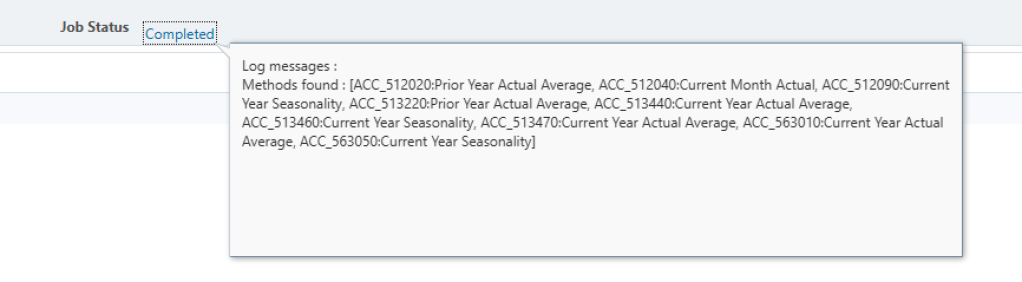
println "Methods found : ${methodByAcct}"
Result in the job console.
Two other commands to consider: use suppression as needed to help control the data returned in your grid.
srcBuilder.setSuppressMissingBlocks(true)srcBuilder.setSuppressMissingRows(true)
Here is the full script:
Cube cube = operation.application.getCube("Plan1")def methodByAcct = [:] as Map<String,String>//define the grid builderdef srcBuilder = cube.flexibleDataGridDefinitionBuilder()//Set suppressionsrcBuilder.setSuppressMissingBlocks(true)srcBuilder.setSuppressMissingRows(true)//Set POVsrcBuilder.setPovDimensions('Scenario','Version','Entity','Years','Period')srcBuilder.setPov('Plan','Working','No Entity','FY26','BegBalance')//Set ColumnssrcBuilder.setColumnDimensions('Plan Element')srcBuilder.addColumn('Trend Method')//Set RowssrcBuilder.setRowDimensions('Account')srcBuilder.addRow('Ilvl0Descendants("Expense Accounts")')//Load gridcube.loadGrid(srcBuilder.build(), false).withCloseable { grid -> //Iterate through the grid grid.dataCellIterator().each { cell -> //Ignore missing and collect the data if (cell.missing) return methodByAcct[cell.getMemberName('Account')] = cell.formattedValue }}println "Methods found : ${methodByAcct}"
 EPM on-the-go
Leave a comment