Have you ever had a client ask, “Why can’t I just enter data at the parent level?” Even after you explain the capability and the pros & cons, your client still doesn’t get it and keeps pushing for it.
The challenge is that most parent members are Dynamic Calc, especially now that we are mostly building hybrid BSO cubes. Essbase calculates Dynamic Calc on the fly and you can’t directly type into a Dynamic Calc member.
Instead of changing the parent members to Stored and use Standard Target version, you can use two Groovy rules to save the number to the lowest member under it.
One forces the cell to be editable, and the other finds the lowest-level member and saves to it.
Force editable
Very simple – you just need to use setForceEditable(true).
//The form only has parent-level rows so force editable on all cellsoperation.grid.dataCellIterator().each { DataCell cell -> cell.setForceEditable(true)}
This opens every cell on the form, so build the form with parent-level rows only.
If it also has read-only cells you want to keep locked, like YearTotal or a closed month, add a check before setForceEditable by using an IF statement.
setForceEditable only opens the cell on the form. The parent member is still Dynamic Calc, so whatever the user types there doesn’t get stored. This is where the second rule comes in.
Find and save to the lowest member
//Find the first level 0 member under a member. A level 0 member returns itselfString getFirstLevel0(Dimension dim, Cube cube, String sMbr) { List<String> lstLeaf = dim.getEvaluatedMembers('Lvl0Descendants("' + sMbr + '")', cube)*.name return lstLeaf.isEmpty() ? sMbr : lstLeaf[0]}//Define CubeCube cube = operation.application.getCube("Plan1")Dimension dimProduct = operation.application.getDimension("Product", cube)DataGridBuilder builder = cube.dataGridBuilder("MM/DD/YYYY")//Same POV and columns as the formList<String> lstPov = operation.grid.pov*.essbaseMbrNamebuilder.addPov(lstPov.toArray(new String[0]))List<String> lstCol = operation.grid.columns[0]*.essbaseMbrNamebuilder.addColumn(lstCol.toArray(new String[0]))//Rows on this form are Entity and Product. Change Product to its first lvl 0 memberoperation.grid.rows.each { DataGrid.Row row -> //Only rows the user changed if (!row.data.any { DataGrid.DataCell cell -> cell.edited }) { return } String sEntity = row.headers[0].mbrName String sProduct = getFirstLevel0(dimProduct, cube, row.headers[1].mbrName) List<String> lstData = row.data.collect { DataGrid.DataCell cell -> cell.missing ? "#Missing" : cell.formattedValue } builder.addRow([sEntity, sProduct], lstData)}//DataGridBuilder.StatusDataGridBuilder.Status status = new DataGridBuilder.Status()builder.build(status).withCloseable { DataGrid grid -> if (status.numRejectedCells > 0) { println("Total number of cells accepted: $status.numAcceptedCells") println("Total number of cells rejected: $status.numRejectedCells") println("First 100 rejected cells: $status.cellsRejected") } cube.saveGrid(grid)}
So if a user types 50,000 at Total Hardware and 12,000 at Total Software, it gets saved to the first product under it.
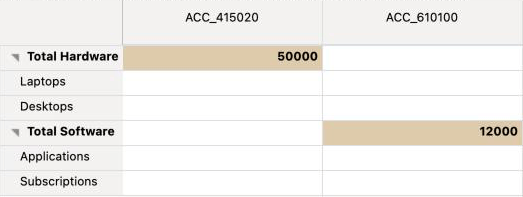
After save.
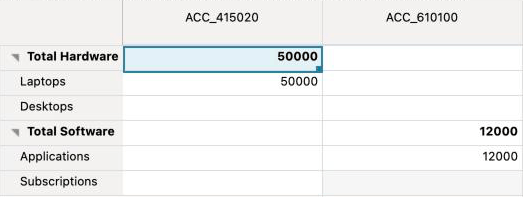
getFirstLevel0 is a function we created. It asks for the level 0 descendants of the row’s member and takes the first one. If the member is already level 0, the list comes back empty, and it returns the member itself.
The rest rebuilds the form. Same POV, same columns, same rows, only Product is changed. Then saveGrid writes it to essbase.
Hopefully this is helpful to you.


Leave a Reply