A useful tool if you need to extract data in a certain format.
Have you ever tried to run an export? The export produces a file with the months on the rows instead of across. It’s not in a reportable format that you prefer.
That’s where csvWriter becomes beneficial.
It is a Groovy function that writes a CSV file to the Inbox/Outbox Explorer. You decide how to format the file. It handles the commas for you, so a value that contains one won’t shift your columns.
This is great if you need to extract data in a format other than the ones EPBCS gives you natively.
The Native Options
Before writing any code, it’s worth knowing what you already have. Here are the native options and what they’re best for:
- Ad hoc grid / Smart View: a one-off pull or a quick analysis
- Export a form to Excel: sharing exactly what’s on a form
- Reports and Financial Reports: formatted output for people to read, as a PDF or Excel
- Export Data job: a repeatable extract in the standard layout. Save the job, then schedule it or run it with EPM Automate
- REST API (exportdataslice): another program pulling a slice of data on its own
- Data Management / Data Integration: a recurring feed to another system that needs its own codes, using mappings
If one of these gives you the file you need, use it. csvWriter is code, and someone has to write it and maintain it.
Where csvWriter helps
csvWriter is for the times none of the above fits. A few places where I’ve found it really useful:
- Exporting data in your own layout. A specific order, only some of the members, or a column the cube doesn’t have, like a code another system needs. If you can build it in a grid, you can write it to a file
- Writing a log file. A println is fine for a few lines, but the job log gets hard to read fast. Write the detail to a file instead: every cell that was rejected, every member the rule skipped and why, or every error it caught along the way
- An exceptions list. Check a whole slice for problems, like an employee with FTE but no salary, and write every one of them to a file instead of stopping at the first one with a veto
- A file for another team. Something they can open in Excel without asking you to reformat it
It also runs anywhere a rule runs: from a form, the Rules list, a ruleset or a schedule. So the export can sit in the same rule that does the calculation.
Let’s take a look
Here’s the data: two entities, three expense accounts, twelve months.
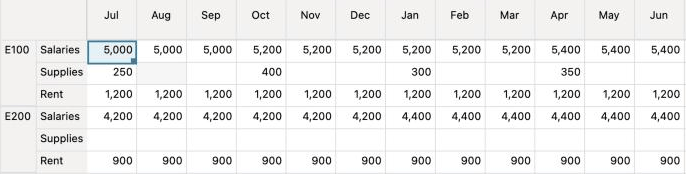
And here’s the rule that exports it:
//Define CubeCube cube = operation.application.getCube("Plan1")//The layout of the file: entity and account down and months acrossFlexibleDataGridDefinitionBuilder builder = cube.flexibleDataGridDefinitionBuilder()builder.setSuppressMissingBlocks(true)builder.setSuppressMissingRows(true)builder.setPovDimensions("Scenario", "Version", "Years")builder.setPov("Budget", "Working", "FY27")builder.setColumnDimensions("Period")builder.addColumn('ILvl0Descendants("YearTotal")')builder.setRowDimensions("Entity", "Account")builder.addRow('ILvl0Descendants("East")','ILvl0Descendants("Total Expense")')String sFile = "Budget_East_FY27.csv"int iRows = 0cube.loadGrid(builder.build(), false).withCloseable { DataGrid grid -> if (grid.rows.isEmpty()) { println "Nothing to export" return } csvWriter(sFile).withCloseable { CsvWriter out -> //Header: the row dimension names, then the column members List<String> lstHeader = grid.rows[0].headers*.dimName + grid.columns[0]*.mbrName out.writeNext(lstHeader as String[]) //One line per row: the row members, then the values grid.rows.each { DataGrid.Row row -> List<String> lstLine = row.headers*.mbrName + row.data.collect { DataGrid.DataCell cell -> cell.missing ? "" : cell.formattedValue } out.writeNext(lstLine as String[]) iRows++ } }}println "Rows written to " + sFile + ": " + iRows
The reading part is a FlexibleDataGridDefinitionBuilder, same as Simple Groovy Part 3.
csvWriter creates the file and gives you a writer. writeNext writes one line and takes a String array, which is why each list ends with as String[]. withCloseable closes the file when the block is done, even if something fails halfway.
Notice the header and the rows are just referencing the builder? The header comes from the grid itself and the row dimension names followed by the column members. Each line is the row’s members followed by its values. So if you change the grid, the code follows.
The Result

The file lands in the Inbox/Outbox Explorer, where you can download it:

Here’s the file:
And the same file opened as a spreadsheet:
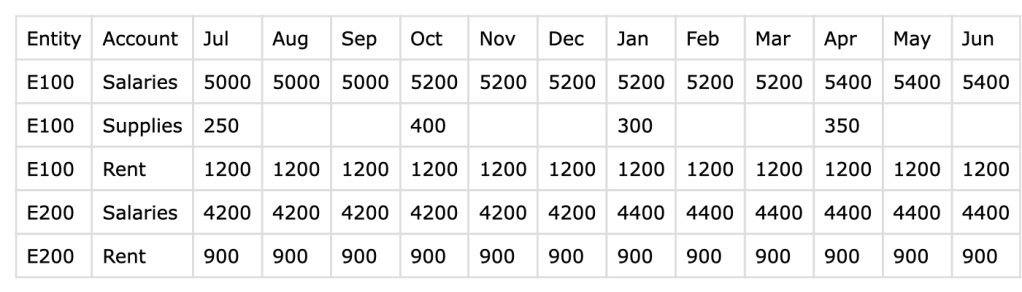
Missing values come through as empty columns, so the file opens cleanly in Excel.
Be careful with the file name. The file is overwritten on every run because sFile is a fixed variable (hard-coded). If you want to keep each file, you will have to change the name every time. The simplest way is to add a timestamp to the file name with a couple of lines of Groovy code, or set the name from a substitution variable you change before each run.
Hope this is helpful!


Leave a Reply